Drupal is a capable platform, but plenty of organizations end up on it for the wrong reasons — a developer's preference five years ago, or a use case (complex multi-site government content) that no longer applies once the site has simplified. When editorial teams are afraid to touch the CMS without a developer, that's usually the signal it's time to move to WordPress. Here's the process we run for these migrations.
Step 1: Content and functionality audit
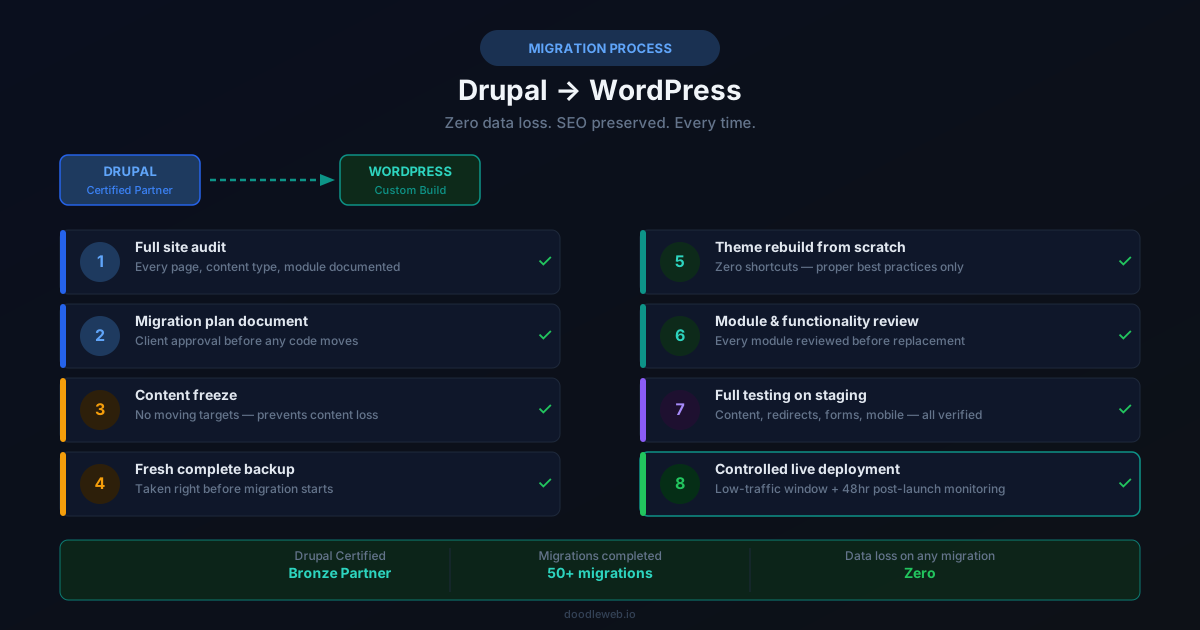
Before touching anything, we export a full inventory of Drupal content types, fields, views, and custom modules in use. A typical mid-size Drupal 7 or 9 site has 60-80% of its content in two or three content types and the rest scattered across one-off types built for features that were used once. This audit determines what actually needs to be rebuilt versus what can be dropped.
Step 2: URL mapping
We pull every existing URL via the Drupal sitemap and crawl (Screaming Frog), then map each to its new WordPress URL. Any URL that changes gets a 301 redirect rule — this list often runs to several hundred rows for a content-heavy site and is the single most important artifact for preserving SEO rankings through the move.
Step 3: Content model translation
Drupal content types and fields map to WordPress custom post types and Advanced Custom Fields groups. Drupal's entity reference fields become ACF relationship or post object fields. Taxonomy terms map to WordPress categories/tags or custom taxonomies depending on how they're used editorially.
Step 4: Data migration
For anything beyond a handful of pages, manual copy-paste isn't viable. We use the WP All Import plugin against a CSV or XML export from Drupal's Migrate API, mapping fields programmatically. For sites with fewer than 50 nodes, direct entry is sometimes faster than building an import pipeline — we make that call per project based on node count and field complexity.
Step 5: Theme and template rebuild
Drupal's Twig templates don't transfer to WordPress. We rebuild the front end from the approved design, usually on a lightweight custom theme with ACF blocks rather than a heavy page builder, to keep the performance gains that are often a primary motivation for the migration in the first place.
Step 6: Module-to-plugin functionality parity
| Drupal module | WordPress equivalent |
|---|---|
| Webform | Gravity Forms or WPForms |
| Views | Custom post type archives with WP_Query, or ACF + template logic |
| Metatag | Yoast SEO or Rank Math |
| Pathauto | Native permalink structure |
| Domain Access (multisite) | WordPress Multisite |
Step 7: Staging QA
Full QA on a staging environment before DNS cutover: every redirect tested individually (not spot-checked), forms tested end to end including email delivery, and a full WCAG 2.2 AA pass since font rendering and focus states often shift during a rebuild.
Step 8: Cutover and post-launch monitoring
DNS cutover during low-traffic hours, then daily Search Console monitoring for the first three weeks watching for crawl errors and unexpected 404s from missed redirects. We keep the old Drupal environment accessible (not public) for 90 days as a reference in case content was missed during migration.
What this actually costs and takes
For a site in the 50-150 page range with moderate custom functionality, budget $18,000-$32,000 CAD and a timeline of 8-14 weeks. Larger multi-site Drupal instances with heavy custom module logic run higher — we scope those individually after the audit in Step 1.
Weighing a move off Drupal? Share your site and content type list and we'll give you a realistic scope and cost.
Surrey, BC
A full-service digital agency working in WordPress, Drupal, Shopify, Webflow, React, and React Native. We partner with universities, governments, and growing brands to ship sites and products that hold up after launch.